
Time travel
While not the flashy kind that introduces paradoxes, Neverkin time travel allows you to navigate over your timeline or move your events around with high precision. To open the time travel dialog, press the T key while on the Timeline.
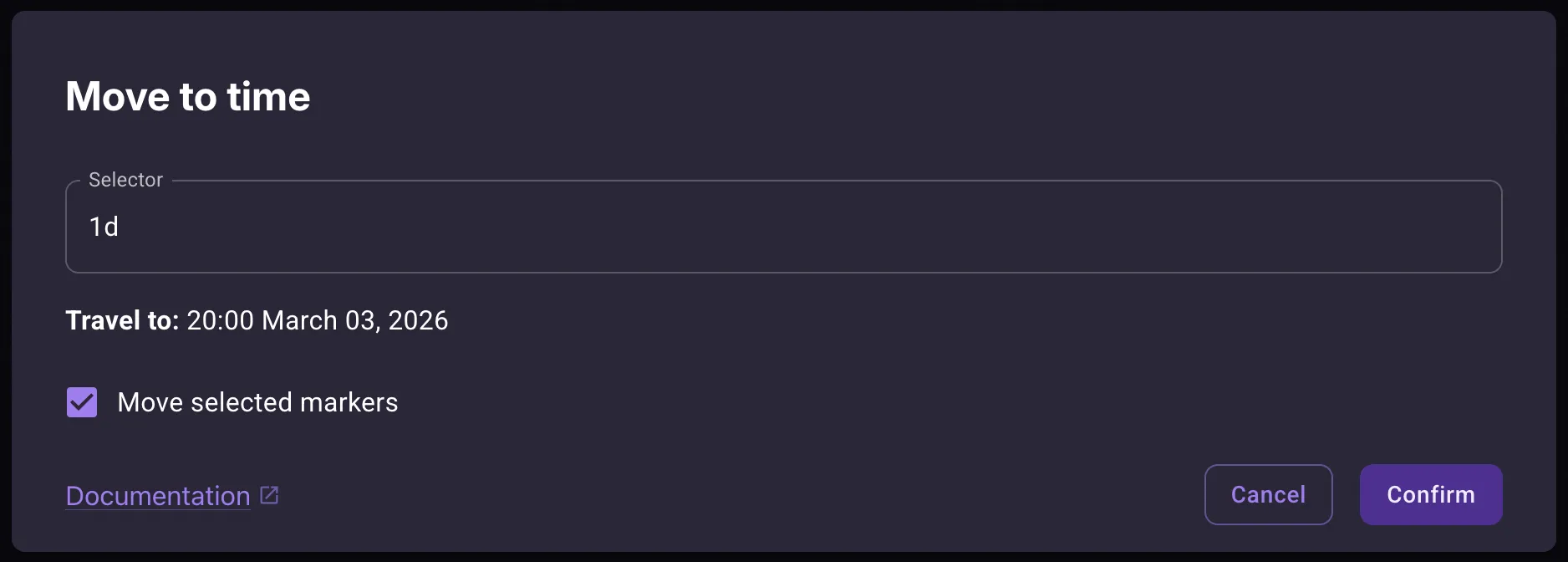
If you have any events selected, you will see the Move selected events checkbox as well. If it’s toggled on, then the events will move according to the time you select. Otherwise, only your view moves.
A preview updates as you type. Press Enter to confirm.
Typing a date
Section titled “Typing a date”The simplest input is a date, written the way your calendar formats them. If your dates look like 00:00 March 01, 2026, you can type:
12:00 May 04, 2030— that exact moment
You can also type part of a date, as long as neighbouring fields stay together:
14:23— that time of day, keeping the current dateMay 04, 2030— that date, keeping the current time of dayMay 04— May the 4th of the current yearSeptember- for named units like months, this is also accepted
Anything you leave out keeps its current value.
In essence, if you type your calendar’s full date format or a long enough sub-string, it should be recognized. For more ambiguous cases like the year alone, see advanced syntax below.
Selectors
Section titled “Selectors”When you only want to change one thing, use a selector instead of writing out a full date. The position of the number decides what happens:
- Unit first —
y2000— sets the unit to that value (absolute) - Number first —
2000y— steps by that many units (relative)
Setting a value
Section titled “Setting a value”| Selector | Meaning |
|---|---|
m15 | move to the 15th minute of the current hour |
h6 | move to the 6th hour of the current day |
d3 | move to the 3rd day of the current month |
y2000 | move to year 2000 |
y-2000 | move to year -2000 |
M3 | move to April (the fourth month) |
Months are zero-indexed: M0 is January, M3 is April.
Stepping by an amount
Section titled “Stepping by an amount”| Selector | Meaning |
|---|---|
15m | 15 minutes forward |
6h | 6 hours forward |
3d | 3 days forward |
3M | 3 months forward |
1y | 1 year forward |
-10y | 10 years back |
Negative numbers step backwards. Setting a value has no direction — y2000 lands on the year 2000 regardless of where you start.
Combining selectors
Section titled “Combining selectors”Separate selectors with spaces. They apply left to right:
y2000 M3 d1— 1st of April, 20003d 15m— three days and fifteen minutes from nowy2000 -1d— the same date in the year 2000, minus one day
Absolute and relative selectors mix freely.
Exact selectors
Section titled “Exact selectors”Adding ! after a selector matches the start of that unit:
y2000— year 2000, keeping the current month, day and timey2000!— 00:00 on the 1st of January, 2000
d1! gives you midnight on the 1st; h6! gives you 6:00 sharp.
Unit names
Section titled “Unit names”The single letters above are shorthands. Each unit also accepts its full name and short name, so y2000, yr2000 and year2000 all do the same thing.
For single-letter shorthands, case matters when two units share a letter. In the Gregorian calendar, minutes and months are both m — minute is lowercase, month is uppercase. Day (d or D) works either way.
Built-in calendars
Section titled “Built-in calendars”As the selectors are slightly different for each calendar definition, you may refer to the following tables for reference about the built-in calendars.
Gregorian Calendar (Earth)
Section titled “Gregorian Calendar (Earth)”Date format: hh:mm MM DD, YYYY
| Unit | Shorthand | Also accepts | Values |
|---|---|---|---|
| Minute | m | min, minute | 0-59 |
| Hour | h | hr, hour | 0-23 |
| Day | d | day | 1-31 |
| Month | M | mon, month | 0-11, or a month name |
| Year | y | yr, year | any non-zero year |
Months — January, February, March, April, May, June, July, August, September, October, November, December.
Darian Calendar (Martian)
Section titled “Darian Calendar (Martian)”Date format: hh:mm SS MM YYYY
| Unit | Shorthand | Also accepts | Values |
|---|---|---|---|
| Minute | m | min, minute | 0-59 |
| Hour | h | hr, hour | 0-23 |
| Sol | s | sol | 1-28 |
| Month | M | mon, month | 0-23, or a month name |
| Year | y | yr, year | any year |
Months — Sagittarius, Dhanus, Capricornus, Makara, Aquarius, Kumbha, Pisces, Mina, Aries, Mesha, Taurus, Rishabha, Gemini, Mithuna, Cancer, Karka, Leo, Simha, Virgo, Kanya, Libra, Tula, Scorpius, Vrishika.
Golarion Calendar (Pathfinder)
Section titled “Golarion Calendar (Pathfinder)”Date format: hh:mm MM DD, YYYY
| Unit | Shorthand | Also accepts | Values |
|---|---|---|---|
| Minute | m | min, minute | 0-59 |
| Hour | h | hr, hour | 0-23 |
| Day | d | day | 1-31 |
| Month | M | mon, month | 0-11, or a month name |
| Year | y | yr, year | any non-zero year |
Months — Abadius, Calistril, Pharast, Gozran, Desnus, Sarenith, Erastus, Arodus, Rova, Lamashan, Neth, Kuthona.
Quadrum Calendar (RimWorld)
Section titled “Quadrum Calendar (RimWorld)”Date format: hh:mm QQQ DD, YYYY
| Unit | Shorthand | Also accepts | Values |
|---|---|---|---|
| Minute | m | min, minute | 0-59 |
| Hour | h | hr, hour | 0-23 |
| Day | d | day | 1-15 |
| Quadrum | Q | qd, quadrum | 0-3, or a quadrum name |
| Year | y | yr, year | any non-zero year |
Quadrums — Aprimay, Jugust, Septober, Decembary.
Exether Calendar
Section titled “Exether Calendar”Date format: hh:mm MM DD, YYYY
| Unit | Shorthand | Also accepts | Values |
|---|---|---|---|
| Minute | m | min, minute | 0-59 |
| Hour | h | hr, hour | 0-23 |
| Day | d | day | 1-31 |
| Month | M | mon, month | 0-11, or a month name |
| Year | y | yr, year | any non-zero year |
Months — Frostmoot, Deepsnow, Winterwane, Rainmoot, Palesun, Highsun, Firemoot, Firewane, Lowsun, Redfall, Snowmoot, Fellnight.